Aggregated review · Lorby-SI / LWR Inc.
Axis and Ohs: six simulators for €18.50, and a demo that undersells it
The utility other products' users keep defecting to, from a developer who warned customers what MSFS 2024 would break five weeks before it shipped.
Ray · August 10, 2026 · 12 min read
Utilities · MSFS 2020 · MSFS 2024 · X-Plane · Payware · Long-term test
Aggregate score: 4.3 / 5 — from 14 sources
- Core function accuracy: 4.5/5
- Feature depth: 4.8/5
- Integrations: 4.6/5
- Interface: 3.4/5
- Performance & stability: 3.9/5
- Value: 4.7/5
The verdict
The best-value serious utility in flight simulation, and the one other products' users keep moving to. One €18.50 licence covers FSX, FSX Steam, Prepar3D v2 through v6, MSFS 2020, MSFS 2024 and X-Plane 12 — against FSUIPC7's €29.99 for a single simulator — and it goes further than any rival: LVars, HVars, BVars and Input Events, three scripting languages, voice recognition, MIDI, virtual instruments served to your phone over WiFi, and per-aircraft profiles that load themselves. The developer runs his own support forum on AVSIM with 7,500 posts, answers the same day, and warned customers five weeks before MSFS 2024 shipped which add-ons the simulator would break, his own included. The one real fault is the demo he insists you try: it does not have all the product's functionality, the sale is explicitly non-refundable, and one customer lost several days to a problem that vanished the moment he paid. Buy it. Do not judge it by the trial.
What owners consistently praise
- One licence covers six simulator platforms — FSX, FSX Steam, Prepar3D v2 to v6, MSFS 2020, MSFS 2024 and X-Plane 12 — at €18.50, against €29.99 for FSUIPC7 and a single simulator
- Support is the best in this category: a dedicated AVSIM forum where the developer has posted roughly 7,500 times, with his MSFS 2024 thread still being answered on 25 June 2026, twenty months after he opened it
- The developer published what MSFS 2024 would break on 12 October 2024, five weeks before release, having had two days with the tech alpha and no early access — and framed it as an industry problem, not just his own
- Depth nothing else matches: LVars, HVars, BVars and Input Events, RPN, JScript and VBScript, MIDI, voice recognition and text-to-speech, checklists, vJoy and ViGEm, a CAN bus interface and a web API
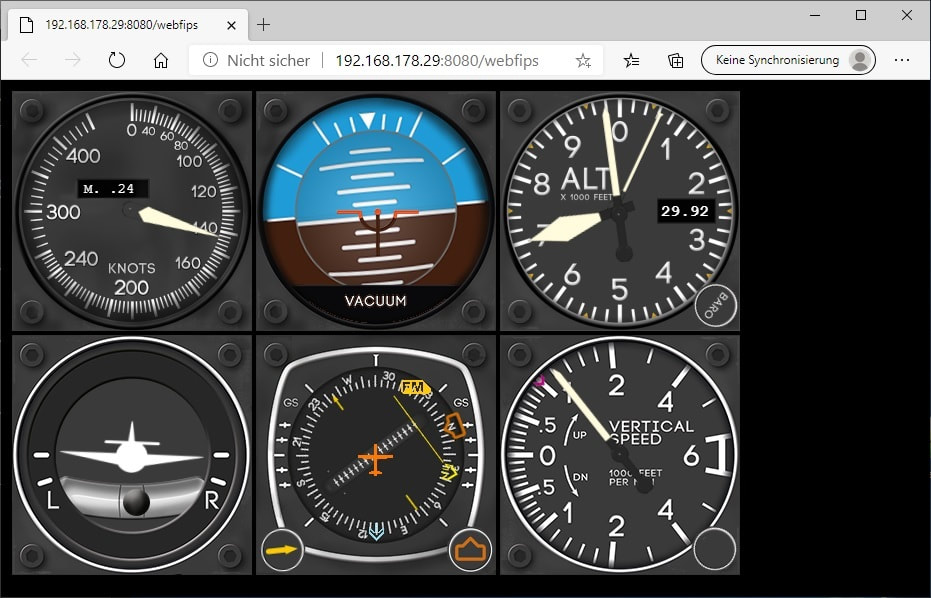
- Virtual flight instruments can be dragged to a second monitor or opened in a browser on a phone or tablet over your own network
- Per-aircraft profiles load themselves — the feature owners most often name as the one they cannot do without
- It revives obsolete hardware: Logitech and Saitek panels, a dated radio panel made to show 8.33 kHz spacing, encoders and a GNS530 driven "with no lag"
- Free updates across five years and dozens of versions, with v4.57 moving to the MSFS 2024 SU5 SDK on 12 June 2026 and v4.58 following a week later
What keeps coming up as a problem
- The mandatory demo is not the product — a customer on 6 July 2026 lost several days failing to get a Stream Deck working on the trial, bought the licence, and found it "worked out of the box": "The demo version does not have all functionality!!"
- The sale is explicitly non-refundable and the vendor's own instruction is to validate your hardware on that same unrepresentative demo
- At MSFS 2024's launch the demo had no 2024 support at all — buyers received the 2024 executable, triallists did not
- A purchased licence can still open in demo mode, reported in March 2025 and again on 22 July 2026, because the installer on the developer's website is always the demo and you must download from your shop account instead
- Applying or linking a template to an aircraft can freeze the application, requiring Task Manager to close it — reported on simMarket on 24 March 2026 with no public resolution
- The learning curve is real and recurs across five years of reviews, from "trying to understand how to make it work consistantly is difficult" in 2021 to "much to learn for me" in February 2026
- The Stream Deck plugin is a freeware side project rather than part of the retail package, and the WebFMC and bridge apps stopped working in MSFS 2024 when Asobo locked the simulator's core files
- The developer's own website still lists compatibility only up to MSFS 2020, omitting MSFS 2024, Prepar3D v6 and X-Plane 12
On 12 October 2024, five weeks before Microsoft Flight Simulator 2024 went on sale, a developer called Oliver Binder posted to his own support forum on AVSIM. He had been given two days with the Tech Alpha. He listed what worked — sim events, LVars, Input Events, BVars, HVars — and then listed what did not, and why it might never.
"In MSFS2024 several core files have been locked and can no longer be overridden by an addon package. Should this logic remain in place, several existing popular addons will no longer be possible (and I don't mean Lorby, I mean everyone)."
He was telling prospective customers, unprompted and before launch, that part of what he sells was about to break. A month later, asked for a release date, he explained he had no early access at all "since AAO cannot be sold in the Marketplace" and would not guess: "there is no way to estimate the necessary effort now."
That is the character of this product. Axis and Ohs is the utility that people in other products' review threads keep quietly defecting to. It costs €18.50 against FSUIPC7's €29.99, and where FSUIPC7 covers one simulator, one licence of AAO covers FSX, FSX Steam, Prepar3D v2 through v6, MSFS 2020, MSFS 2024 and X-Plane 12. Its developer has 7,500 posts on his own support forum and answers the same day. He gives away a pile of freeware tools alongside it.
And the single worst thing about it is the demo he insists you try first.
We read thirteen sources for this review: two store listings and every review text on both, the developer's own site, documentation and dated changelog, three AVSIM threads including his 151-reply support thread, an official MSFS forums thread, two tutorial videos, and the FSUIPC7 listing for comparison.
What you are actually buying
An external application that takes over controller logic from the simulator, and then keeps going a very long way past that.
| Price | €18.50 simMarket · €21.97 / $20.25 flightsim.to |
| Simulators, one licence | FSX Acceleration, FSX:SE, P3D v2–v6, MSFS 2020, MSFS 2024, X-Plane 12 |
| Current version | 4.58 b02 — changelog dated 19 June 2026 |
| First released | 21 August 2020 |
| Updates | Free, across years and dozens of versions |
| Demo | Yes, and read the section below before you rely on it |
The core job: assign any axis or simulator event to any Windows game controller or MIDI device, with calibration curves, jitter filtering, gated detents, and one axis carrying several functions at once — throttle and beta on the same lever, for instance. Profiles save per aircraft and load automatically when you select one.
Then it keeps going. Direct access to LVars, HVars, BVars and MSFS Input Events, so you can drive things the simulator's own binding menu never exposes. Scripting in RPN, JScript and VBScript. Windows voice recognition and text-to-speech, with a custom checklist and conversation system. Virtual flight instruments you can drag onto a second monitor or open in a browser on your phone or tablet over WiFi. Mouse yoke. vJoy and ViGEm. A CAN bus interface. A web API. Native support for Saitek Multi, Radio and Switch panels and up to four Saitek FIPs, plus bridge applications for Elgato Stream Deck, VRI MCP Combo II, Knobster, Arduino and generic HID devices.
Two things to know about that list. The Stream Deck plugin is not part of the retail package — an official reply on flightsim.to describes it as "just a hobby project, a freeware addition". And the WebFMCs and bridge add-ons that transport data out of the sim stopped working in MSFS 2024 because Asobo locked the core files, which the developer announced before the simulator shipped.
What the community consistently praises
Value, and it is the first thing reviewers reach for. Christopher, simMarket, 18 October 2025, comparing it directly and unprompted to the obvious rival: "I know FSUIPC can be used to configure controls too but this program can do things that FSUIPC cannot. Also, with Axis and Ohs, you get versions for every flight simulator, including FSX, P3D and MSFS all for one low price." Andreas, in German the previous November, closed his review with the same point — free updates across years and many versions.
Second, support, and this is the strongest such record we have found in this category. The developer runs a dedicated AxisAndOhs forum on AVSIM where he has posted roughly 7,500 times. His MSFS 2024 thread alone has 151 replies and 30,500 views, opened in October 2024 and still being answered on 25 June 2026 — a user with LVars failing on one of two machines got a diagnosis the same day. Viktor, May 2023: "the support is incredible, feature requests are implemented in the matter of a few days". CapnKen, February 2025: "stellar support by the author… Can't say enough about the author's support."
Third, the per-aircraft profile switching, which is the feature owners describe as the one they cannot give up. Viktor again: "I couldn't use MSFS without AaO anymore since it automatically switches profiles based on the aircraft I'm using."
Fourth, it makes old hardware live. Christa, August 2021, had real trouble with Logitech panels and the Logitech plugin: "Jetzt ist alles bestens" — now everything is fine, even under Windows 11. md195, May 2026, uses it so a dated Saitek radio panel can display 8.33 kHz channel spacing. djlidgley, January 2026, drives encoders and buttons on a desktop panel and a GNS530 "with no lag".
Fifth, the basics are genuinely easy even though the ceiling is not. JonN19's review of 1 April 2026 is the fairest summary anyone has written: configuring some plugins is complicated and the scripting is quirky, "but such is the price for the flexibility this offers" — and then, "it's very straightforward to add standard controls: select game function from drop-down, click on the input device, push the button, save."
And sixth, the developer tells you what is broken before you pay. That October 2024 warning about locked core files was published five weeks ahead of a simulator he had no early access to, and it named the problem as the industry's rather than his own.
What keeps coming up as a problem
The demo is not the product — still open, and it is the sharpest complaint here
Every shop selling this leads with the same instruction, in capitals: "PLEASE TRY THE DEMO VERSION FIRST, TO MAKE SURE THAT YOUR HARDWARE IS SUPPORTED! There will be no refunds, and there won't be any support for non-functional hardware."
streamfuchs took that advice on 6 July 2026 and lost several days to it. He was trying to get a new Stream Deck + and XL working with the AAO plugin and community templates for the PMDG 777-300ER in MSFS 2024. "It took me several days of trying and debugging to get it to work without any success, no chance. As a last try I decided to buy the licensed version and from that moment on it worked out of the box as expected." His conclusion, and he set it in double exclamation marks: "everyone should be aware of the fact that it is not only the 20min. limitation which makes the difference between the 4.58 b02 demo version and the licensed version. The demo version does not have all functionality!!"
That is not a small thing when the purchase is explicitly non-refundable and the vendor's own instruction is to validate your hardware on the demo. It has precedent, too: when MSFS 2024 launched, users on the official forums in November 2024 found the demo had no MSFS 2024 support at all — purchasers got the 2024 executable, triallists did not.
Buying it does not always stop it behaving like a demo — still open
brianofficer, 22 July 2026: "Am I doing something wrong that after purchasing the full version it still opens in demo mode?" barryvernick hit the same thing in March 2025 after rebuilding a disk. The answer, given in an official reply on the store, is that you must download from your shop account and not from axisandohs.com, because "the one from the AAO website is always the demo." That is a reasonable design and an easy trap, and nothing on the website says so.
The learning curve — a permanent feature, not a bug
Ian's three-star simMarket review of 5 October 2021 has aged well as a description: "Great program in many ways but trying to understand how to make it work consistantly is difficult, when I can get it to work it is impressive." He scored it 3 stars while writing "Rate it as a 8 out of 10", which tells you something about store ratings as well as about the software.
It recurs. aberhard, February 2026: "Very good. But much to learn for me." fusedye, January 2026, added a rudder axis and got a text field reading a raw RPN expression where tutorial videos had shown a configurable bar, and could not work out why his looked different. André's 2021 verdict is the counterweight and is probably the truth: "After a certain training period, it is easy to operate and leaves almost nothing to be desired."
Specific faults, unanswered on the storefronts
Robert, simMarket, 24 March 2026: applying or linking any template to any aircraft freezes the program, requiring Task Manager to kill it. "I look for solution but none helps." No reply on the store — though the AVSIM forum is where he would have got one.
LucFanders, 14 June 2026: the download billed as v4.57 installed v4.56. oeildefaucon, 1 August 2026, in French: could not install it correctly and received no answer to his email. Both recent, both unresolved in public.
MSFS 2024's first weeks were rough — mitigated
Through November and December 2024 the official MSFS forums thread filled with SimConnect connection failures: "Waiting for SimConnect" hangs, Stream Deck connections dropping after updating, and a workaround of ticking "Force connection to running sim". The changelog shows the platform work that followed, and the current build tracks the SU5 SDK.
Antivirus false positives
flightsim.to's own listing carries the warning: "This software may be flagged as a false positive by some antivirus programs due to its nature." CapnKen reports Norton blocking it outright with no ignore option, the fix being a Safe Web exclusion. Unlike some tools in this category, the warning is at least stated up front by the shop.
The developer's own website is behind his software
The compatibility list on the axisandohs.com "Where to buy" page stops at Microsoft Flight Simulator 2020. No MSFS 2024, no P3D v6, no X-Plane 12 — all of which the product supports, the stores advertise and the changelog covers.
Performance and stability
No one reports a frame-rate cost. It is an external application talking over SimConnect, and across 21 simMarket reviews, 27 on flightsim.to and three AVSIM threads nobody suggests otherwise.
Stability is good with two qualifications. The first is environmental: antivirus interference, installer-versus-shop-download confusion, and the SimConnect handshake problems that clustered around MSFS 2024's launch. The second is the template freeze reported in March 2026, which is the only report in the record of the application locking up in normal use and which has no public resolution.
Against that, the update cadence is the best in this category by a distance. Version 4.53 in May 2025 brought progressive axis filtering and gated detents; 4.55 in October 2025 added config auto-load and automated backup restoration; 4.56 in January 2026 added MSFS 2024 night-vision variables and redesigned mouse button pickup; 4.57 on 12 June 2026 moved to the SU5 SDK and opened X-Plane WebAPI access; 4.58 landed a week later. Nothing else we have reviewed this month is moving at that rate.
Who should buy it
If you have a complex cockpit — several controllers, panels, encoders, a Stream Deck: buy it. This is the case it wins outright. An AVSIM poster with seven peripherals called it "that rare thing: a solid product with almost instantaneous support" and said it has never let him down.
If you fly more than one simulator: buy it. One licence covers six platforms including X-Plane 12 and every Prepar3D since v2. Nothing else in this category comes close, and it is the cheapest option in it.
If you own old or orphaned hardware — Saitek panels, GoFlight-era kit, a dated radio panel: buy it. Making obsolete boxes work again is a recurring theme in its reviews going back to 2021.
If you already own FSUIPC7 and are content: you do not need this. They overlap heavily, and there is no sense buying a second controller layer to do what one already does. The reason to switch is coverage or price, not capability you are missing today.
If you will not read documentation: do not buy this. Every critical review in the record is a version of the same sentence. There is a manual and a busy forum, and people who use neither struggle.
If you are buying because of a specific Stream Deck or bridge integration: check what is retail first. The Stream Deck plugin is a freeware side project, not part of the package, and the WebFMC and bridge apps do not work in MSFS 2024 because of a simulator change.
Do not treat the demo as proof it will work. That is the awkward advice this review has to give, because the vendor's instruction is the opposite. A customer who followed it properly, and failed, bought anyway and found it worked instantly.
Where it stands today
Axis and Ohs is the best-value serious utility in flight simulation and one of the least written-about. There is no trade-press review of it anywhere we could find, no video that is not a tutorial, and forty-eight store reviews across two shops — for a product other add-ons' users keep naming as the thing they moved to. Its reputation is entirely word of mouth, and the mouths belong to people with seven peripherals.
The two ratings tell a useful story between them. simMarket shows 21 reviews at a rounded 5, which on the actual spread of 19 five-star, one four-star and one three-star is 4.86. flightsim.to shows 4.3 across 27, and its reviews are where the friction lives — the install problems, the demo confusion, the licence reverting. Both are describing the same software; the second sample is describing the first hour of owning it.
That first hour is the whole criticism. Once it is running, the record is close to unanimous and stretches back five years. Getting it running means understanding that the demo is not the product, that the installer on the website is not the one you bought, and that the answers are on AVSIM rather than the shop page. None of that is difficult. All of it is undocumented in the places a new buyer looks.
Our 4.3 is the highest score we have given a utility, and it is held back from higher by exactly one thing: a mandatory, non-refundable trial that does not do everything the product does. Fix the demo and this is a 4.6. As it stands, buy it — and buy it knowing that if the trial disappoints you, that may not be the software talking.
Marketed vs. delivered
Each claim below is taken from the developer’s own marketing, then weighed against what owners report in the sources listed at the end of this review.
Overstated
"PLEASE TRY THE DEMO VERSION FIRST, TO MAKE SURE THAT YOUR HARDWARE IS SUPPORTED! There will be no refunds, and there won't be any support for non-functional hardware."
Sound advice attached to an unrepresentative trial, which makes it worse than no advice. On 6 July 2026 a customer followed it exactly — several days trying to get a Stream Deck + and XL working with the PMDG 777-300ER in MSFS 2024, "without any success, no chance" — then bought the licence and found it worked immediately. His warning: the difference is "not only the 20min. limitation… The demo version does not have all functionality!!" There is precedent: at MSFS 2024's launch the demo carried no 2024 executable at all. A non-refundable purchase gated on a trial that cannot demonstrate the product is the one genuinely unfair thing about how this software is sold.
Partly true
The developer's own site lists compatibility as "FSX boxed edition with the Acceleration pack… FSX Steam Edition… P3D Version 2.5… 3.x… 4.x… 5.x… Microsoft Flight Simulator (2020) - MSFS".
Accurate as far as it goes and three platforms short. The product also supports MSFS 2024, Prepar3D v6 and X-Plane 12 — all listed by simMarket and flightsim.to, all covered by the changelog, with v4.57 adding X-Plane WebAPI access on 12 June 2026. A prospective buyer checking the official website before a shop would conclude this does not work in the current simulator. The software is ahead of the page selling it.
Holds up
"Single license covers all simulator versions" — and, from a customer, "you get versions for every flight simulator, including FSX, P3D and MSFS all for one low price".
Verified across both storefronts and the requirements list: FSX Acceleration, FSX Steam Edition, Prepar3D v2 through v6, MSFS 2020, MSFS 2024 and X-Plane 12, on one purchase, with updates free across five years and dozens of versions. Nothing else in this category offers that spread — FSUIPC7 covers MSFS alone for €29.99 and licenses each generation separately. For anyone still flying Prepar3D or moving between simulators, this is the cheapest option and the broadest at the same time.
Holds up
"Completely stand alone software - does not change config files or settings."
Holds up. Across 48 store reviews and three AVSIM threads spanning five years, nobody reports it altering the simulator's own configuration, and the complaints that do exist are about its installer and its own interface rather than damage to anything else. The MSFS 2024 breakages it suffered came from Asobo locking core files against add-ons, which is the opposite failure mode — and the one Community package it does install is documented, and was the first thing the developer asked about when a customer's variables would not read.
The last word
Two of the checks above go against the way this product is sold rather than the way it is built, so let the record stand on its own. This is a developer who tested against an MSFS 2024 tech alpha he had two days with, published what would break before anyone could pre-order, and named the problem as the whole industry's rather than his own. Who answers a support question about LVars failing on one of two machines within hours, on a thread he opened twenty months earlier. Who has shipped free updates across five years and dozens of versions on an €18.50 licence, tracked the SU5 SDK within days of it landing, and gives away a shelf of freeware tools beside the paid one. Customers keep using the same word about him — responsive — and the ones who have been running seven peripherals for years say it has never let them down. On the evidence, that is all true.
on the Axis and Ohs V4
Sources (14)
- simMarket listing — €18.50, version 4.58 b02, 21 reviews (19 five-star, 1 four-star, 1 three-star)
- flightsim.to store — $20.25, rated 4.3 across 27 verified reviews, last updated 16 June 2026, with the demo and licence complaints
- Axis and Ohs — the developer's own site and feature list
- Axis and Ohs — Where to buy, whose compatibility list still stops at MSFS 2020
- Axis and Ohs — Downloads, carrying the demo the storefronts insist you try first
- Just Flight — AxisAndOhs v4 dated changelog, running to v4.58 on 19 June 2026
- Lorby-SI — AxisAndOhs documentation for Microsoft Flight Simulator
- AVSIM: "AAO and MSFS2024" in the developer-run AxisAndOhs Support forum — 151 replies, 30,500 views, opened 12 October 2024 and still answered on 25 June 2026
- Microsoft Flight Simulator forums: "AAO 2024 available" — the SimConnect connection problems and the demo's missing MSFS 2024 support, November to December 2024
- AVSIM: "MSFS Controls… or external? FSUIPC, SPAD…" — 8 January 2025, where a seven-peripheral owner calls AAO the best choice with almost instantaneous support
- AVSIM: "FSUIPC7 FOR MSFS" — including the user who uninstalled FSUIPC the day he got Axis and Ohs
- simMarket: FSUIPC7 for MSFS at €29.99 — the single-simulator rival, for price comparison
- LORBY-SI: "Lorby AxisAndOhs: Flight Controls (MSFS)" — the developer's own tutorial, 24K views
- Flight Sim and Other Stuff: "x-touch AAO (Axis and Ohs) lesson 1" — a community tutorial series, 6.7K views
About the reviewer

Ray
Ray is a flight sim fanatic who’s always hunting for the next addon worth trying. From MSFS to DCS, he pulls together real-world user experiences, community reactions, reviews, and hands-on impressions to give fellow simmers a clear picture of what’s worth their time.
Developer’s own page: Axis and Ohs V4