Aggregated review · TechnoBrain Co., Ltd.
RJBB Kansai International: the best Kansai in the sim, still fighting its own ground
TechnoBrain's Kansai has been the definitive RJBB since 2022 — and the store badge saying MSFS20/24 is a compatibility patch from November 2025, not a 2024 build.
Ray · July 18, 2026 · 13 min read
Airports · Scenery · MSFS 2020 · MSFS 2024 · Payware · Long-term test
Aggregate score: 4.0 / 5 — from 23 sources
- Visual fidelity: 4.5/5
- Accuracy to the real airport: 4.2/5
- Terrain and ground surfaces: 3.0/5
- Ground detail and clutter: 3.4/5
- Night lighting: 3.6/5
- Performance: 4.6/5
- Value: 3.8/5
The verdict
Four years on, TechnoBrain's Kansai is still the only serious rendition of RJBB for Microsoft Flight Simulator, and the exterior work — Renzo Piano's 1.7 km terminal, the Sky Gate Bridge, the shape of the reclaimed islands themselves — genuinely earns its price. What it has never quite managed is the ground: the runway and taxiway surfaces have been reported as uneven from April 2022 onwards, were wrecked outright by World Update 20 in September 2025, and were patched twice more in November 2025 and June 2026. Along the way, community volunteers built the terrain fix, the logo fix, the gate-coding fix and the static aircraft this €19.99 airport does not include. Buy it — there is nothing else — but buy it knowing that the MSFS 2024 support is a compatibility patch on a 2020 scenery, and that the last ten per cent is still, four years later, somebody else's job.
What owners consistently praise
- Universally regarded as the definitive RJBB for MSFS since release day — Twinfinite, simMarket buyers and the Japanese blog record all reach the same verdict independently
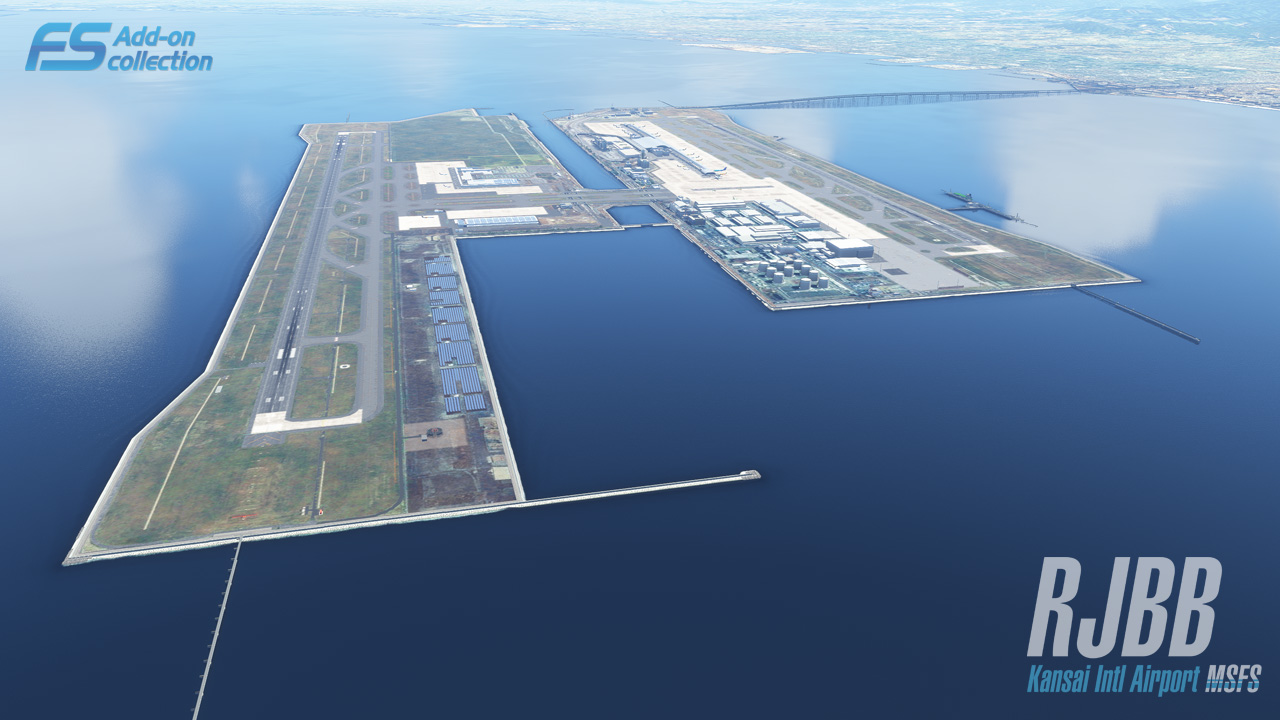
- The terraforming of the two reclaimed islands is the hardest thing about this airport and the best thing in the product: clean bank profiles, correctly cut roads under the taxiways, and a fully modelled Sky Gate Bridge with its railway deck
- Runway and taxiway texturing and markings were verified against charts by Twinfinite in March 2022, along with SIDs, STARs, instrument approaches and PAPI calibration — a functional endorsement, not just an aesthetic one
- Performance is genuinely excellent: a measured 5–6 FPS cost at 1440p ultra on an RTX 3070, in one of the densest urban areas any MSFS airport sits in
- Landside detail goes further than the price suggests — train station, Hotel Nikko, animated trains, the Sky View observation deck and detailing beneath the elevated access roads
- Four years of free updates with no paid upgrade: September 2022, November 2025, January 2026 and June 2026, the last of them fixing the northern apron terrain
- One purchase genuinely covers both MSFS 2020 and MSFS 2024 — a single 971 MB package, no separate build, no upgrade fee
What keeps coming up as a problem
- Uneven runway and taxiway surfaces have been reported since 9 April 2022, again on 26 April 2022 and 9 May 2023, and were made far worse by World Update 20 in late September 2025 — fixed in November 2025 and again in June 2026, but four years of recurrence is a pattern
- No modelled terminal interiors, only parallax shaders, in a building that is essentially one continuous glass wall — flagged as the weakest point in March 2022 and still open in 2026 beyond the apron-side gate areas added that September
- Real-world logos are altered to avoid trademark exposure (SMBC becomes MSBC) and the Hotel Nikko loses its branding; a community texture fix appeared on 10 April 2022, sixteen days after release, and is still needed
- No static aircraft ship with the scenery, and gate-to-airline and cargo-ramp coding were wrong enough that community creators rebuilt them in 2024 and populated the stands separately in 2025
- A March 2024 buyer report that the runway 24R ILS lines up on the parallel taxiway has never been publicly answered — the only navaid entry in the changelog is a January 2026 fix for RWY06R, a different runway end
- Tetrapods, ferry docks and the on-island railway — the artificial island's most recognisable furniture — are sparse, missing or painted onto the orthophoto, and none has been addressed in four years
- English-language support is thin: there is an English site, product page and FAQ, but no developer forum, no public support thread and no visible support address — serial-number problems are routed back to the store
- The MSFS 2024 support is a compatibility pass added in November 2025, three and a half years after release, with no 2024-native features anywhere in the record — the MSFS20/24 store badge will mislead buyers who read it as a 2024 product
Kansai International Airport is sinking. Not metaphorically — the two artificial islands it sits on in Osaka Bay have been settling into the seabed since before the first aircraft landed in 1994, and the terminal's columns are jacked up on adjustable plates to keep Renzo Piano's roof level while the ground underneath it goes down. It is the one airport in the world where "the ground is not flat" is a design brief rather than a bug report.
Which makes TechnoBrain's RJBB the most darkly appropriate scenery in Microsoft Flight Simulator, because for four years the single most repeated complaint about it has been that the ground is not flat.
Everything else about this add-on is close to settled. Since it arrived on 22 March 2022 nobody credible has argued that it is anything other than the best Kansai available for MSFS, and the field it entered was not empty — DominicDesignTeam had shipped a payware RJBB four months earlier, on 9 November 2021, and simMarket buyers had taken it apart. TechnoBrain's version was better on almost every axis that mattered, and buyers said so within hours. The first simMarket review, posted on release day, called it the most accurate Kansai on the market.
The argument since has been about two things, and they are the reason this review exists rather than a shrug and a link. The first is the terrain, which has been broken, fixed, broken again by a Microsoft world update, and fixed again — most recently in June 2026. The second is that "MSFS20/24" badge on the store page, which does not mean what a buyer scanning a storefront will assume it means.
This review draws on 23 sources: both simMarket listings and the in-sim Marketplace record, TechnoBrain's English and Japanese product pages and support material, a full written and video review, forum threads on AVSIM and the official MSFS forums, six community mods built specifically to patch or populate this scenery, two Japanese-language blog posts, and the release news record. Reddit, normally the fastest read on community sentiment, is unavailable in this environment, so the sentiment tally below leans harder than usual on store reviews and on what people actually built to fix the thing.
What you are actually buying
One purchase. One SKU. There is no separate MSFS 2024 build, no upgrade fee, and no second download — the same 971 MB package covers both simulators, and that part of the marketing is straight.
What it is not is an MSFS 2024 product. TechnoBrain's own changelog is unambiguous about the sequence: the scenery shipped for MSFS 2020 in March 2022, and the line "Compatible MSFS2024" appears in the November 2025 entry, three and a half years later, alongside terrain fixes and World Update 20 optimisation. SceneryAddons, which tracks this distinction for a living, files it as MSFS 2020 native and MSFS 2024 compatible. Nothing in the record — not the changelog, not the feature list, not any review — describes a single MSFS 2024-native feature. If you are buying for 2024 specifically, you are buying a 2020 airport that has been made to load.
| Product | RJBB Kansai Intl Airport MSFS |
| Developer | TechnoBrain Co., Ltd. (Japan) |
| Released | 22 March 2022 (simMarket) · 25 March 2022 (in-sim Marketplace) |
| Current version | 1.1.2, last updated 11 June 2026 |
| Simulators | MSFS 2020 (native) · MSFS 2024 (compatibility patch, November 2025) |
| Xbox | No |
| Download size | 971 MB |
| simMarket | €19.99 |
| In-sim Marketplace | $19.99 (¥2,350 in Japan) |
| Rivals | DominicDesignTeam RJBB, €18.50 (MSFS 2020 only) · a freeware RJBB on flightsim.to |
A note on that price, because it is easy to get wrong. simMarket's terms state that displayed prices "include the respectively applicable value added tax", and for a browser session with no country resolved that rate is zero — so €19.99 is not automatically comparable with $19.99 on the Marketplace, and FS Addon Compare's habit of rendering the simMarket figure as $23.29 is a currency-and-tax artefact rather than evidence that simMarket is dearer. We are not calling either store cheaper. They are within a rounding error of each other before tax, and which one wins depends entirely on where you live.
TechnoBrain has no shop of its own. Its English product page lists exactly two sales channels — the Marketplace and simMarket — and its Japanese page lists only the Marketplace. The ¥2,350 Japanese price, quoted by the Japanese flight-sim blog fs-travel.net, is Marketplace regional pricing, not a domestic discount TechnoBrain is choosing to offer. There is no cheaper Japanese route in.
Where it sits in TechnoBrain's catalogue
TechnoBrain is a long-established Japanese studio with a deep FSX and Prepar3D back catalogue — Haneda, New Chitose, Naha, Itami, Kobe, Yao, Ishigaki and Miyako, a Tokyo photoscenery, ATC missions, even a 787-9. The MSFS catalogue is much smaller: three airports, RJTT Haneda, RJBB Kansai and RJOY Yao. Kansai is the middle child of a short line, and it is the largest and most complex airport of the three. Read the "substantial catalogue" claim carefully — most of it is for simulators two generations old.
Support is a real consideration for a non-Japanese buyer, and the honest answer is that it is thin but present. There is an English site, an English product page and an English FAQ. There is no developer forum, no public support thread and no visible English support address; the FAQ routes serial-number problems back to simMarket or wherever you bought it. Nobody in the record reports being stuck without help, but nobody in the record reports a developer reply either.
What the community consistently praises
The terraforming — which is a joke the airport gets to make about itself, since the shape of the two reclaimed islands is exactly what a scenery developer usually gets wrong. Twinfinite's Giuseppe Nelva, reviewing on 26 March 2022, singled it out: developers routinely struggle with artificial islands because their hard geometric edges fight the sim's organic terrain, and here the banks are cleanly shaped and the roads passing under the taxiways are properly cut. A simMarket buyer on 26 April 2022 independently praised the same thing, and specifically noted that TechnoBrain modelled the Sky Gate Bridge connecting the island to the mainland — including its railway deck.
The runway and taxiway texturing. Nelva called it top-notch, verified the markings against charts down to the subtle ones, and confirmed that published SIDs, STARs and instrument approaches all matched, with PAPI lights correctly calibrated per runway. That is a functional endorsement, not an aesthetic one, and it is the single most useful thing anyone has said about this scenery.
The terminal exterior. Piano's 1.7 km wing — the longest airport terminal in the world — is the reason anyone flies here in a simulator, and the modelling and weathering of it are the least disputed thing in the whole record. The landside detail extends further than it usually does at this price: the train station, the Hotel Nikko, animated trains, and detailing tucked under the elevated access roads that almost nobody models.
The Sky View observation deck, which Nelva described as one of the airport's best features, and which fs-travel.net's Japanese write-up also picked out — two reviewers in two languages independently landing on the same small building is about as good as corroboration gets.
And the patch record. Four years, four update rounds, no paid upgrade: September 2022 (airline codes on every gate and stand, apron-side gate interiors, the Rinku Gate Tower across the water, approach lights, taxiway bridges), November 2025 (MSFS 2024 compatibility, custom CGL, World Update 20 terrain), January 2026 (RWY06R ILS/GS, parking radii and positions), June 2026 (northern apron terrain). The Japanese blog fs-travel.net made a point of it in its September 2022 post — paraphrasing, since we are not quoting Japanese we cannot verify in translation: the writer valued that TechnoBrain kept improving the product rather than abandoning it after the sale.
What keeps coming up as a problem
The ground. Repeatedly. Fixed — for the fourth time
This is the spine of the record. On 9 April 2022, eighteen days after release, a simMarket buyer wrote five words: runway and taxiway are not flat. On 26 April 2022 another buyer gave it five stars anyway and then spent a paragraph on the same thing, naming the J3 and J4 connector taxiways between the islands and runway 24R specifically. On 9 May 2023 a third buyer called the runway too bumpy for a 0.0 gradient.
Then World Update 20 (Japan) arrived in late September 2025 and made it dramatically worse. A thread on the official MSFS forums reported severe elevation distortion and duplicated jetways at RJBB across both MSFS 2020 and 2024, with one poster judging the airport unusable. A simMarket buyer said the same on 9 November 2025: bumps everywhere, unusable, hoping either Asobo or TechnoBrain would fix it.
What happened next is the most telling thing in this review. Two separate people built free fixes. A creator called kentoasty published a bilingual hotfix in October 2025 targeting runway 06L/24R — describing Kansai's B runway, in Japanese, as bokoboko, roughly "all lumps" — and then, on being told by a user that 06R/24L was also affected, replied that they had been unaware and would widen it to the whole island. A second creator, Astrolavos, published a broader terrain fix on 18 November 2025, updated it on 29 November, and then marked their own file deprecated with a note that TechnoBrain's v1.1.0 had made the scenery MSFS 2024-compatible and fixed the terrain across the airport. Between them the two fixes were downloaded roughly 1,700 times in a matter of weeks.
TechnoBrain did fix it — in November 2025, and again in June 2026 for the northern apron. But the pattern is four years of a surface that will not stay level, and a paying customer's practical experience of Kansai has, more than once, depended on a stranger's 8 KB zip file.
No terminal interiors. Still open
Nelva called this the scenery's weakest point in March 2022 and the argument has not moved. Kansai's terminal is a glass wall; parked at a gate you are looking straight into it. TechnoBrain uses parallax shaders rather than modelled interiors. The September 2022 update added apron-side gate interiors — seating areas visible through the glass, which the Japanese blog record welcomed — but the main hall, the part everyone photographs, is still not there. This is a deliberate design choice by a developer with, on Nelva's own performance figures, the frame budget to have done otherwise.
Altered and missing real-world logos. Still open, worked around
TechnoBrain repaints real corporate marks to avoid trademark exposure — the SMBC signage that covers this airport becomes "MSBC", and the Hotel Nikko loses its branding. Sixteen days after release, on 10 April 2022, a community creator called WeChe published a texture pack that puts the real logos back and adds missing ones. Four years later the base product still ships with the altered marks.
Static aircraft and gate coding. Mitigated, not solved
The scenery ships with no static aircraft at all. At launch, gates were not assigned to airlines and cargo ramps were coded as general aviation, which broke dedicated cargo AI — Nelva flagged both in March 2022. TechnoBrain's September 2022 update added airline codes to every gate and stand, and January 2026 fixed parking radii and positions. It was still not enough: a creator called Ryanosaurus13 published a full AI and ground overhaul in early 2024, built on airline data sampled between 20 January and 20 February 2024, hand-coding gates to their real operators and fixing cargo apron classification. A separate creator, ixvst01, published an FSLTL static-aircraft layout in 2025 purely to populate the empty stands.
The ILS complaint nobody has closed
On 2 March 2024 a simMarket buyer reported that the ILS for runway 24R was "way off to the left", lining an approach up on the parallel taxiway. In January 2026, TechnoBrain's changelog records a fix — for RWY06R's ILS and glideslope. That is a different runway end on a different runway. We cannot establish from the public record whether the 24R report was investigated, dismissed, silently fixed, or is a duplicate of something else. Status: unresolved in public.
The island furniture
Tetrapods — the concrete jacks lining every reclaimed Japanese coastline, and arguably the visual signature of an artificial-island airport — are used sparingly and substituted with flat texture. The ferry docks are missing. The railway is modelled on the bridge and then simply painted onto the ortho once it reaches the island, so the overhead catenary poles that are conspicuous in the real world are absent. A simMarket buyer in April 2022 and Nelva in March 2022 raised the same three items separately. None has been addressed.
Performance and stability
This is the strongest part of the product and it is not close. Nelva measured a 5–6 FPS cost against default at 1440p on ultra settings with an RTX 3070 and a Ryzen 9 3900X — for a dense scenery in one of the busiest urban areas in Japan, that is a small bill. The first simMarket buyer on release day noted "nice fps" unprompted. The Marketplace record, 77 ratings averaging 4.7, contains no performance complaint pattern. "Frame rates friendly" is one marketing claim that survives contact with the evidence intact.
There is a caveat with teeth, though, and it points back at the section above: Nelva's own conclusion from the low frame cost was that TechnoBrain had headroom it did not spend. The tetrapods, the terminal interior, the railway — all of them were affordable. Efficiency here reads partly as restraint and partly as a budget left unused.
Stability-wise there is nothing alarming in the record: no crash reports, no CTD threads, no save corruption. The one hard warning is a conflict, not a bug — SceneryAddons flags that this scenery and DominicDesignTeam's RJBB must not be installed together. Pick one.
Who should buy it
If you fly in Japan and you fly into Kansai, buy it. There is no serious alternative. The freeware RJBB on flightsim.to has not been updated in three years, carries a 3.0 rating from its own users, and its author has said openly that a simulator problem forced him to build it in an external editor with the limitations that implies. The one rival payware is older, MSFS 2020 only, and rated 2.9 by simMarket's own buyers on arithmetic. This is the only Kansai worth flying.
If you fly MSFS 2024 exclusively and you want a 2024-native airport, adjust your expectations before you pay. It works — a forum poster flying it in FS2024 reported no problems at all until World Update 20 broke it — and it is patched and current. But it is a 2020 scenery with a compatibility pass, not a product built for the newer simulator, and you should buy it knowing that.
If you are a screenshot and ground-detail obsessive, this is not for you. No interiors in the building that most needs them, no static aircraft, altered logos, sparse tetrapods. You will spend your first evening installing three community mods to get where a €20 airport arguably ought to start.
If you are a Japan-region VATSIM or long-haul flyer, buy it, and budget an hour. Add Ryanosaurus13's AI and gate overhaul, ixvst01's FSLTL statics and WeChe's logo fix. With those three installed this is a genuinely excellent airport; without them it is a beautiful, empty one.
If you already own it and stopped flying it after World Update 20, come back. It is fixed. Update to 1.1.2 and delete the community terrain patches from your Community folder — the author of one of them says so himself.
Where it stands today
As of August 2026 this is a four-year-old MSFS 2020 airport that has been kept alive by an unglamorous, unbroken maintenance habit. Version 1.1.2 landed on 11 June 2026 to fix the northern apron. Nobody markets that. Very few developers still do it.
The gap between the two ratings on the two stores tells you something honest about the reception. simMarket displays a headline 5 out of 5 across seven reviews, but the actual spread is four fives and three fours — an average of 4.57, not 5, and every one of those four-star reviews is about the ground. The Marketplace, on 77 ratings, sits at 4.7 with 81% at five stars and a single one-star outlier. Both numbers say the same thing: near-universal approval with a persistent, specific, recoverable complaint underneath it.
What has not changed in four years is the shape of the judgement. Above about three metres, this is a 4.5-class airport — the terminal, the bridge, the island profile, the markings, the frame rate. Below three metres it has been a 3.0 for most of its life: an uneven surface, empty stands, altered signage, absent tetrapods. That gap is exactly why the breakdown above spreads as widely as it does, and why the headline lands at 4.0 rather than the 4.5 the terminal alone would earn. Buy it for the approach and the view from the gate. Do not buy it expecting the last ten per cent.
Marketed vs. delivered
Each claim below is taken from the developer’s own marketing, then weighed against what owners report in the sources listed at the end of this review.
Overstated
"Version for Microsoft Flight Simulator (MSFS2020/2024)"
One purchase does cover both simulators — a single SKU, one 971 MB download, no upgrade fee — and that part is straight. But TechnoBrain's own changelog dates "Compatible MSFS2024" to November 2025, three and a half years after the March 2022 MSFS 2020 release, and SceneryAddons classifies the product as MSFS 2020 native and MSFS 2024 compatible. No source in the record identifies a single MSFS 2024-native feature. This is a 2020 airport that has been made to load in 2024, and the storefront badge does not say so.
Partly true
"Extremely realistic airport"
Above ground level, largely true: the terminal exterior, the bridge, the island profiles and the chart-accurate ground markings all hold up under scrutiny from a reviewer who checked them against published procedures. Below it, less so. There are no modelled terminal interiors in a glass building, no static aircraft, altered corporate signage, sparse tetrapods, missing ferry docks, a railway painted onto the ortho, and a runway surface that repeatedly failed to be flat between 2022 and 2026.
Holds up
"Frame rates friendly"
Holds up, and it is the least disputed claim on the page. Twinfinite measured a 5–6 FPS cost at 1440p on ultra settings with an RTX 3070 in March 2022; the first simMarket buyer noted the frame rate approvingly on release day; and 77 Marketplace ratings averaging 4.7 contain no performance complaint pattern. The only qualification is that the same reviewer read the low cost as evidence of headroom TechnoBrain chose not to spend.
Partly true
"Excellent night techniques, realistic runway lighting according to official documents of the airport"
Split down the middle. Runway, taxiway and apron lighting were praised specifically, and the custom lights on the approach light bridges were called out as a highlight. The terminal itself is another matter — described as mediocrely lit, which compounds the absent interiors, since the building you are parked against is both dark and hollow. The claim is accurate about the runways and quietly silent about the terminal.
The last word
None of the above should obscure how unusual TechnoBrain's behaviour has been. This is a 2022 airport that got a substantive free update in June 2026, from a small Japanese studio with three MSFS titles to its name, for customers who mostly cannot read its language. It made Kansai's most difficult feature — two artificial islands with hard geometric coastlines that the simulator's terrain engine actively fights — look easy, and it did it while costing five frames. When a World Update broke it, it was fixed inside two months. Kansai in MSFS existed as a disappointment before March 2022 and has been a pleasure ever since, and that is entirely TechnoBrain's doing.
on the RJBB Kansai Intl Airport
Sources (23)
- simMarket — RJBB KANSAI INTL AIRPORT MSFS20/24 (listing, changelog and 7 buyer reviews)
- TechnoBrain — RJBB Kansai Intl Airport MSFS, official English product page
- テクノブレイン — FSアドオンコレクション RJBB Kansai Intl Airport MSFS (official Japanese product page)
- TechnoBrain — FS Add-on collection English FAQ and support pages
- Twinfinite — Microsoft Flight Simulator: Kansai Airport Review (Technobrain), Giuseppe Nelva, 26 March 2022
- Twinfinite video review — approach, landing and full airport flyover, March 2022
- TechnoBrain — RJBB Kansai Intl Airport MSFS official trailer
- AVSIM — [REVIEW] Kansai International Airport (RJBB) by Technobrain
- MSFS official forums — Technobrain: RJBB Kansai International Airport announcement thread
- MSFS official forums — Terrain elevation issues and duplicate jetways at Osaka RJBB after World Update 20, September 2025
- flightsim.to — Technobrain RJBB RWY06L/24R fix for World Update 20 Japan, by kentoasty (bilingual, October 2025)
- flightsim.to — [Deprecated] Terrain fix for Technobrain's RJBB Kansai, by Astrolavos, November 2025
- flightsim.to — TECHNOBRAIN's RJBB logo fix, by WeChe, 10 April 2022
- flightsim.to — Technobrain RJBB Osaka Kansai ground enhancement and AI config, by Ryanosaurus13, 2024
- flightsim.to — RJBB Osaka Kansai FSLTL static aircraft for Technobrain, by ixvst01
- flightsim.to — RJBB Kansai International Airport, freeware by nsajid91 (the free alternative)
- MSFS Marketplace listing — price, 77 ratings and full star breakdown
- FS Addon Compare — RJBB Kansai Intl Airport cross-store pricing
- SceneryAddons — TechnoBrain RJBB Kansai International Airport (MSFS 2020 native, MSFS 2024 compatible)
- simFlight — Technobrain: Kansai Intl RJBB in Japan for MSFS released, 24 March 2022
- fs-travel.net — 関西2大空港の有償シーナリー (Japanese: payware scenery for Osaka's two airports, incl. ¥2,350 Marketplace price)
- fs-travel.net — アップデートされた関西空港:MSFS (Japanese: the September 2022 update assessed)
- simMarket — DominicDesignTeam RJBB Kansai International Airport MSFS, the rival payware (7 reviews, 2.9 average)
About the reviewer

Ray
Ray is a flight sim fanatic who’s always hunting for the next addon worth trying. From MSFS to DCS, he pulls together real-world user experiences, community reactions, reviews, and hands-on impressions to give fellow simmers a clear picture of what’s worth their time.
Developer’s own page: RJBB Kansai Intl Airport